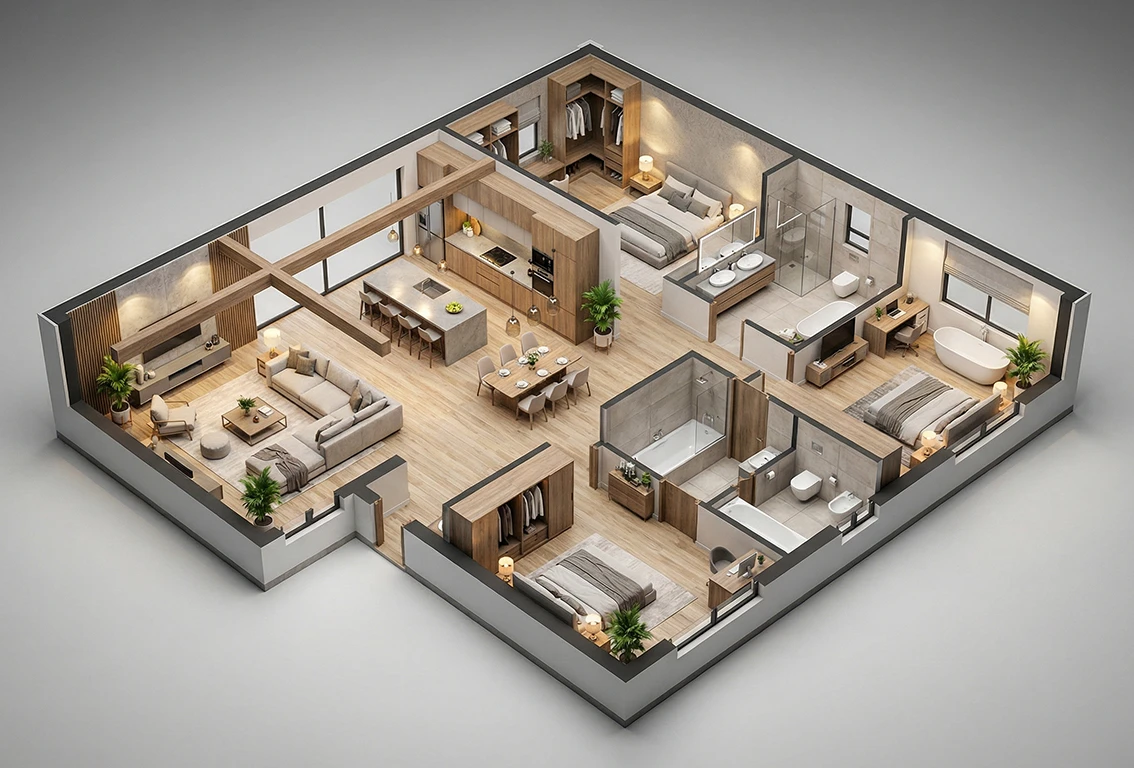
Floor planning is one of the most time-intensive parts of any interior design or architectural project. An AI floor plan generator doesn’t replace your judgment—it eliminates the repetitive groundwork so you can focus on the decisions that actually require expertise.
This guide walks through exactly how AI tools fit into a professional workflow, what Planner 5D specifically brings to the table, and how to get the most out of these tools without creating more work than they save.
What Is an AI Floor Plan Generator?
An AI floor plan generator is software that uses machine learning to help designers create, modify, and optimize spatial layouts. Instead of building a plan from scratch every time, you input your constraints—room dimensions, functional requirements, traffic flow preferences—and the system produces a workable starting point or a complete draft.
The “AI” component refers to the system’s ability to make intelligent spatial decisions: suggesting where walls should go based on building logic, recommending furniture arrangements based on room proportions, or automatically detecting conflicts between structural elements and your design intent.
The better tools also understand design rules that would take a junior assistant years to internalize—things like sightlines, natural light optimization, and the relationship between circulation paths and usable square footage.
Worth noting: AI generators work best as a first-pass tool. They’re fast at producing technically sound layouts but lack the contextual understanding that comes from actually visiting a site and talking with clients. Use them to accelerate, not to automate entirely.
Why Professional Designers Are Adopting AI Floor Plan Tools
The adoption curve among professional designers has been steep over the past two years, and the economics are straightforward:
Faster iteration. Generating three or four layout alternatives used to take a full day of drafting. AI tools can produce those alternatives in minutes, giving you more time to evaluate options rather than produce them.
Reduced revision cycles. When clients can visualize a space in 3D before you’ve finalized a plan, they catch problems early. That means fewer costly late-stage revisions.
Lower barrier for client communication. Not every client can read a traditional floor plan. AI tools that pair 2D layouts with real-time 3D views bridge that gap without extra work on your end.
Scalability. If you want to take on more projects or grow your practice, AI tools are how you do that without proportionally expanding your hours.
None of this replaces the strategic thinking, material expertise, or client relationship skills that define a strong designer. What it replaces is the mechanical production work—the hours spent adjusting wall coordinates and regenerating views after every client change.
Planner 5D: An AI Floor Plan Generator Built for Professional Use
Among the current crop of AI floor plan tools, Planner 5D stands out for its combination of accessibility and depth. It handles the full workflow from initial layout to client-ready 3D rendering, and its AI features are woven throughout rather than bolted on as an afterthought.
Key AI Features That Matter for Professionals
AI Smart Wizard. The core AI feature. You input room count, dimensions, and style preferences, and the system generates a complete, structurally logical floor plan as your starting point. Every element the AI produces is fully editable—you’re working from a solid foundation, not locked into the AI’s first draft.
Real-time 3D rendering. Every change in the 2D plan updates the 3D view instantly. No separate render queue, no export process. This is the feature that most dramatically changes how client presentations work.
Object library with 7,000+ items. Browse by style, category, or dimension. Realistic materials mean the 3D view is actually useful for client communication, not just spatial validation.
Client sharing via link. Share a live project link so clients can explore the space in 3D on their own device, without any software installed. This surfaces feedback between meetings, before you’ve committed to a direction.
VR preview. For clients who need an immersive spatial experience before approving a design direction, the VR mode is a meaningful differentiator.
The Smart Wizard: Where AI Does the Heavy Lifting
For experienced designers, the Smart Wizard is most valuable on residential projects with standard room configurations. It handles the basics—circulation, zoning, basic room relationships—so you can spend your time on the spatial decisions that actually require your expertise.
A practical tip: run two or three Smart Wizard generations with slightly different room counts or dimensions before committing to a starting layout. The AI will often solve the circulation problem differently each time, and one of those solutions may align better with your design intent than the others.
How to Integrate an AI Floor Plan Generator Into Your Workflow
The goal isn’t to hand off your process to AI—it’s to compress the time spent on mechanical tasks so more of your hours go toward work that requires design judgment.
Step 1 — Start with your site data. Input accurate measurements from your site survey. The AI’s output is only as good as the constraints you give it—rough dimensions produce rough plans.
Step 2 — Run the AI generation. Use the Smart Wizard to generate an initial layout. Treat it as a brainstorm, not a blueprint. Generate multiple versions if the project scope allows.
Step 3 — Evaluate the output critically. Check circulation paths, natural light, sight lines, and room proportions. The AI optimizes for layout logic but doesn’t know your specific client’s lifestyle or preferences.
Step 4 — Refine and add design intent. Adjust walls, modify room relationships, and add the elements that reflect your concept and the client brief. This is where your expertise takes over from the algorithm.
Step 5 — Present with the 3D view. Use Planner 5D’s real-time 3D for client presentations. The ability to walk a client through a space virtually—and make changes live during the meeting—dramatically shortens approval cycles.
Step 6 — Iterate quickly. When clients request changes, make them in the 2D view and watch the 3D update instantly. What used to be a week’s back-and-forth often compresses to a single session.
AI Floor Plan Generators: How Planner 5D Compares
There are several tools in this space worth knowing.
| Tool | AI Generation | Real-time 3D | Object Library | Best For |
|---|---|---|---|---|
| Planner 5D | Full AI wizard | ✓ Yes | 7,000+ objects | Interior designers, residential |
| RoomGPT | Partial | Static renders | Limited | Quick concept visualization |
| SketchUp + plugins | Via plugins | ✓ With extensions | 3D Warehouse | Architects, technical users |
| Magicplan | AR scanning | Basic 3D | Minimal | Site measurement & documentation |
| Homestyler | Partial AI | ✓ Yes | Large catalog | Residential interior staging |
Planner 5D’s main advantage over most competitors is the combination of true AI layout generation and real-time 3D in a single, browser-based tool. You don’t need to export between programs to show a client a 3D view—it’s always live alongside your 2D work.
Honest Limitations to Know Before You Rely on AI
Any guide that skips the limitations isn’t actually useful. Here’s what AI floor plan generators currently don’t do well:
Structural engineering constraints. AI tools work with the walls and dimensions you give them but don’t understand structural loads, beam spans, or bearing walls. Always validate AI-generated plans against structural requirements before presenting them as buildable.
Building codes. Egress requirements, accessibility standards, and local code specifics vary enormously. AI tools may not flag violations—that responsibility stays with you.
Complex site conditions. Sloped lots, irregular property lines, or unusual orientations require human judgment. AI tools generally work best on clean rectangular footprints.
Design intent. The AI doesn’t know your concept. It doesn’t know the client wants the kitchen to overlook the garden, or that the master suite needs to feel removed from the main living areas. That context lives in your head, not in the algorithm.
Best practice: Use AI-generated plans as validated starting points, not finished products. Run a code-compliance check on any plan before presenting it as a design proposal, regardless of how it was created.
Using AI Plans for Better Client Presentations
One area where AI floor plan generators genuinely transform professional practice is client communication. The traditional design presentation—2D drawings that clients struggle to interpret, followed by weeks of revision—is a well-documented friction point.
Planner 5D’s real-time 3D changes this dynamic. When a client sees their future kitchen from the perspective of someone standing at the island, they give better feedback. They stop asking “how big will that feel?” and start having more useful conversations about what they actually want.
Live design sessions. Bring a laptop to client meetings and make changes in real time. Clients become collaborators rather than approvers, which tends to build stronger buy-in.
Shareable links. Share a project link so clients can explore the 3D model on their own device between meetings. This surfaces feedback before you’ve committed to a direction.
Side-by-side options. Generate two or three layout alternatives and show them in 3D side-by-side. Clients choose better when they can compare rather than evaluate a single option in isolation.
Frequently Asked Questions
Does using an AI floor plan generator mean lower-quality design work? Not if you use it correctly. The AI handles spatial logic and produces a starting point—design quality depends on what you do with that foundation. Most designers find that AI tools actually improve output quality because they have more time and energy for high-judgment decisions.
Can I use Planner 5D for commercial projects, not just residential? Yes. Planner 5D works for commercial spaces including offices, retail environments, and hospitality projects. The object library covers commercial furniture categories, and the AI generation handles larger, more complex footprints. Highly technical commercial projects—hospitals, labs, industrial facilities—will still need specialized CAD tools for code-compliant documentation.
Do I need design software experience to use an AI floor plan generator? Planner 5D is built to be accessible without a steep learning curve. The Smart Wizard is designed so that non-designers can generate basic layouts. For professional use, you’ll want to spend time learning the editing tools—but the barrier is much lower than traditional CAD software.
How accurate are AI-generated layouts? Dimensionally accurate if you input accurate measurements. The AI respects the constraints you give it. Spatially, layouts are generally sound from a circulation and zoning perspective, but they won’t always reflect your specific design priorities without manual refinement.
Can I export plans from Planner 5D for use in other software? Yes. Planner 5D supports export to multiple formats, including high-resolution images for presentations and PDF for documentation. Depending on your plan tier, you can also export in formats compatible with other design software workflows.
Is Planner 5D free for professional use? Planner 5D offers a free tier with core functionality and paid plans that unlock higher-resolution exports, additional AI features, and the full object library. For professional and commercial use, a paid subscription is the practical choice—the free tier is better suited to evaluating the tool before committing.
The Bottom Line
An AI floor plan generator is a professional tool, not a shortcut that undermines craft. The designers getting the most value from tools like Planner 5D aren’t using them to do less work—they’re using them to redirect their effort toward the parts of design that clients actually pay for: creative judgment, spatial storytelling, and problem-solving that no algorithm has figured out yet.
If you haven’t built AI-assisted floor plan generation into your workflow, the gap between your capacity and a competitor’s who has is growing. Planner 5D is a practical, well-designed starting point—and the real-time 3D presentation capability alone tends to justify the time investment within the first project.
Try Planner 5D on a current project using the free tier. Run the Smart Wizard with your actual site dimensions and see how long the initial layout takes. Most designers find that evaluation convincing enough.